> For the complete documentation index, see [llms.txt](https://kakaobusiness.gitbook.io/global/llms.txt). Markdown versions of documentation pages are available by appending `.md` to page URLs; this page is available as [Markdown](https://kakaobusiness.gitbook.io/global/kakao-global-dsp-guide-english/quickstart.md).
# Quick Start Guide
{% hint style="info" %}
* If you are starting ads for the first time, follow the steps below to easily sign up and register.
{% endhint %}
{% hint style="success" %}
📌 Kakao Global DSP Link
{% endhint %}
## 1. Creating an Ad Account
An ad account is required to run ads on Kakao Global DSP and serves as the basic unit for ad operations.
### 1-1. Creating a New Ad Account (Directly by Advertiser/Agency)
**Step 1.** Click **\[ Sign Up ]** on the Kakao Global DSP login screen.
Kakao Global DSP supports Korean, English, and Japanese. The language selected during sign-up will be set as the default language after login. You can change the default language in My Info after logging in.
**Step 2.** Review the Privacy Policy Agreement, check the boxes to agree, and click **\[ Proceed ]** to continue signing up.
Fill out the information on the "Request Access" screen and click **\[ Submit ]**. You will receive an approval email once it is finalized once an administrator finishes reviewing you ad.
| **Request Access** |
| ------------------------------------------------------------------------------------------------------------------------------------------------------------------------------------------------------------------------------------------------------------------------------------------------------------------------------------------------------------------------------------------------------------------------------------------------------------------------------------------------------------------------------------------------------------------------------------ |
|
Type Advertisers should select "Advertiser," and agencies should select "Agency."
|
|
Country Please select the country where the advertiser/agency's business is located. If you are running ads via an overseas corporation, please input the country information based on that overseas entity. \* Example: If your business is located in Japan, select Japan under Country.
If you select Japan under Country, enter the required business information based on your business type.
Corporation: A T-Number is required.
Sole Proprietor: Enter your business registration number.
|
|
Time Zone When running a campaign, select the desired ad serving time zone. Ads will be served according to the time zone set in the Advertiser account. (Time targeting, etc.)
|
|
Contact Name, Contact E-Mail, Contact Phone Enter the contact information for the advertiser or agency representative signing up.
|
{% hint style="success" %}
When selecting a time zone, the agency’s time zone does not matter. **Choose the ad serving time zone preferred by the advertiser.** Ads will be served according to the time zone set in the Advertiser account. (Time targeting, etc.)
{% endhint %}
{% hint style="warning" %}
Please note that the **Time Zone can only be set once and cannot be changed later, so make sure to select it carefully.**
{% endhint %}
{% hint style="info" %}
There are two ways for advertisers to run ads:
**Option 1)** You can proceed through Kakao's official agency.\
**Option 2)** You can run ads directly. (OLS)
To proceed via OLS, the advertiser must enter country information based on an overseas corporation:
* **Country :** select the country where your business is actually located.
* **Address :** enter the business address in the selected country.
{% endhint %}
### 1-2. Creating a New Ad Account and Requesting Account Mapping (By Existing Agency)
If you are an agency that already has a Kakao Global DSP account and want to create a new advertiser account under it, please follow the steps below to create an advertiser's account:
**Step 1.** While logged out of your agency account, follow the procedure outlined in **Section 1-1. "Creating a New Ad Account (Directly by Advertiser/Agency)** to create the new advertiser account.
{% hint style="success" %}
Agencies managing accounts on behalf of advertisers should confirm the process with Kakao in advance.
{% endhint %}
{% hint style="warning" %}
Even if the agency and its advertiser are located in different countries, select Country based on the country where the advertiser’s business is actually located.
{% endhint %}
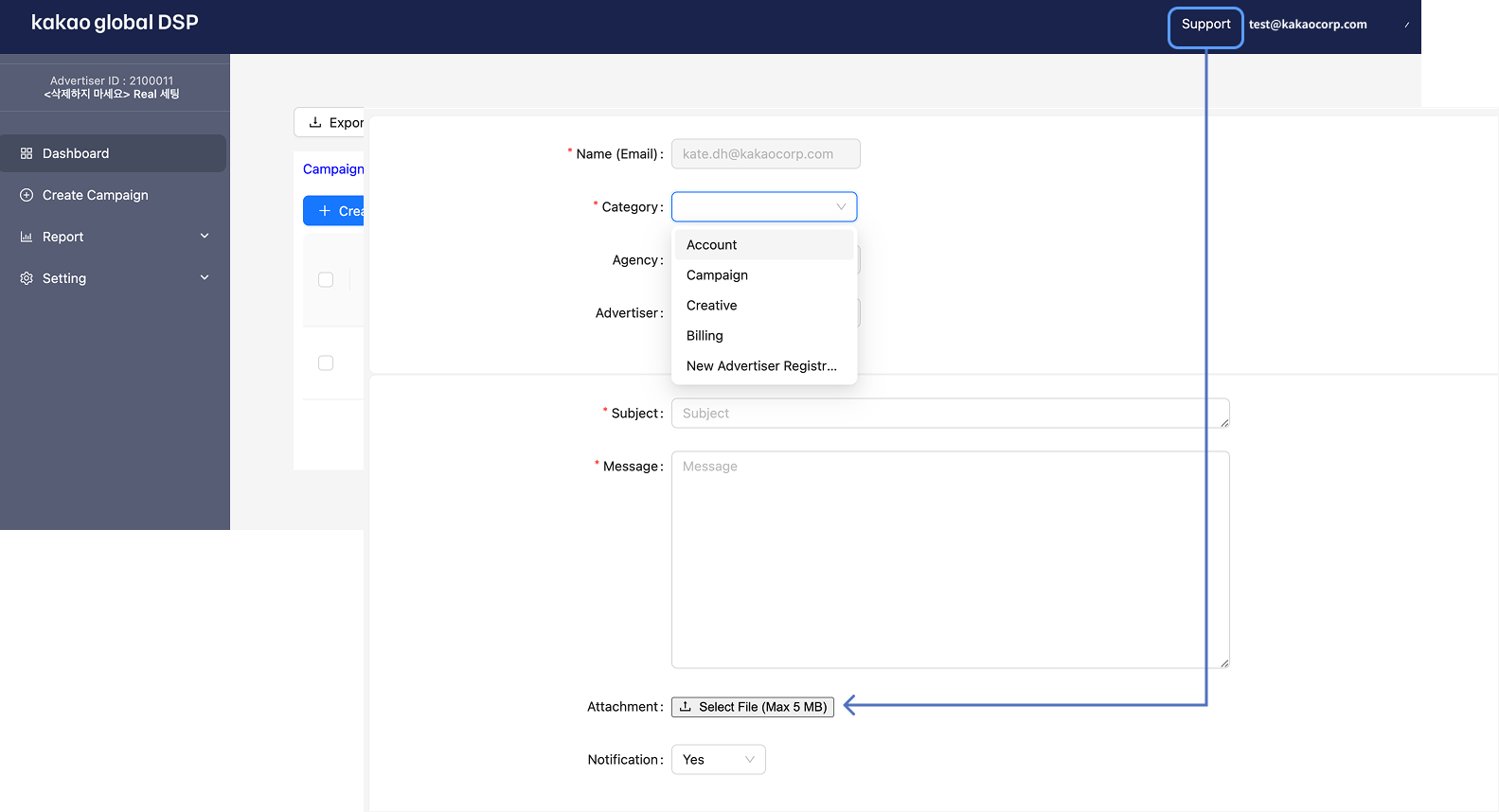
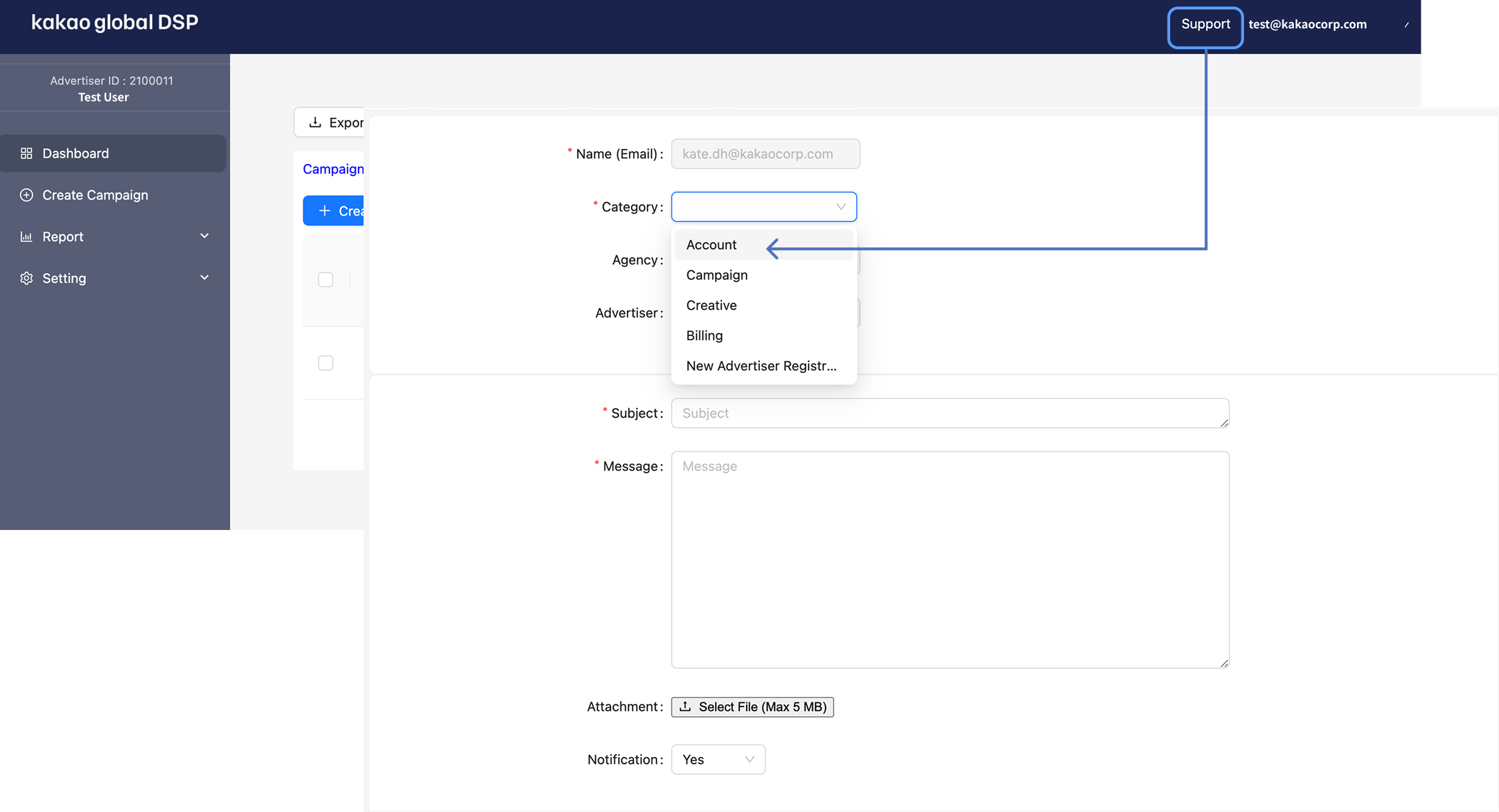
**Step 2.** After logging back into the agency account, please request the agency-advertiser account mapping via **\[Support]** in the Global DSP. The scope of advertiser account management and transfer may vary depending on the agency’s sales rights in each market. For more information, please contact your Kakao representative.
**Step 3.** If you are an agency that is managing account on behalf of the advertiser, attach an authority delegation statement note or redacted contract under **\[Support]** > 'Attachment' in the Global DSP.
{% hint style="info" %}
The scope of campaign management and account transfer for advertiser accounts may vary depending on the agency’s sales rights in each market. For more information, please contact your Kakao representative.
{% endhint %}
For any other inquiries, **please contact \[Support] in Kakao Global DSP**.
### 1-3. Creating a Login (User) Account for Advertiser/Agency Access
If you have an advertiser or agency account, you can create a User account to access the Company.
If you need a Login (User) account, **please contact \[ Support ] within Kakao Global DSP.**
## 2. Loading Ad Cash
Ad Cash is the cash used to pay for advertising expenses on Kakao Global DSP.\
Kakao Global DSP supports two payment methods: Prepaid and Postpaid. With Prepaid, you can add funds in advance via a foreign currency bank transfer or credit card payment.
### 2-1. Prepaid
This is a prepaid method where you add funds in advance via a foreign currency bank transfer or credit card payment and use the prepaid balance for ad spending.
{% hint style="success" %}
TheThe Ad Cash amount does not include VAT, and advertising costs are also based on VAT-exclusive amounts. Ad Cash recharge amounts are **exclusive of VAT**, and **Korean advertisers under Korean agencies or direct advertisers who are Korean entities may be subject to VAT**.
VAT is applied at the time of ad spend deduction for advertisers managed under a Korean agency and direct advertisers whose businesses are located in Korea.
{% endhint %}
{% hint style="warning" %}
Each ad account is provided with both a USD Wallet and a JPY Wallet. When adding funds, select the Wallet you want to fund.
* USD Wallet: Add funds in USD
* JPY Wallet: Add funds in JPY
{% endhint %}
{% hint style="info" %}
An email notification will be sent when your prepaid balance falls below the specified threshold or is fully depleted. Please check your remaining balance regularly to avoid any disruption to your campaign delivery due to insufficient funds.
{% endhint %}
{% hint style="warning" %}
When the set daily budget is exceeded, there may be a time lag before ads are automatically paused, during which additional charges may occur. Additional charges may occur if valid impressions, clicks, or conversions are recorded during this time, or if ad exposure and spending increase at a specific point.
{% endhint %}
#### 2-1-1. Wire Transfer Fee Information
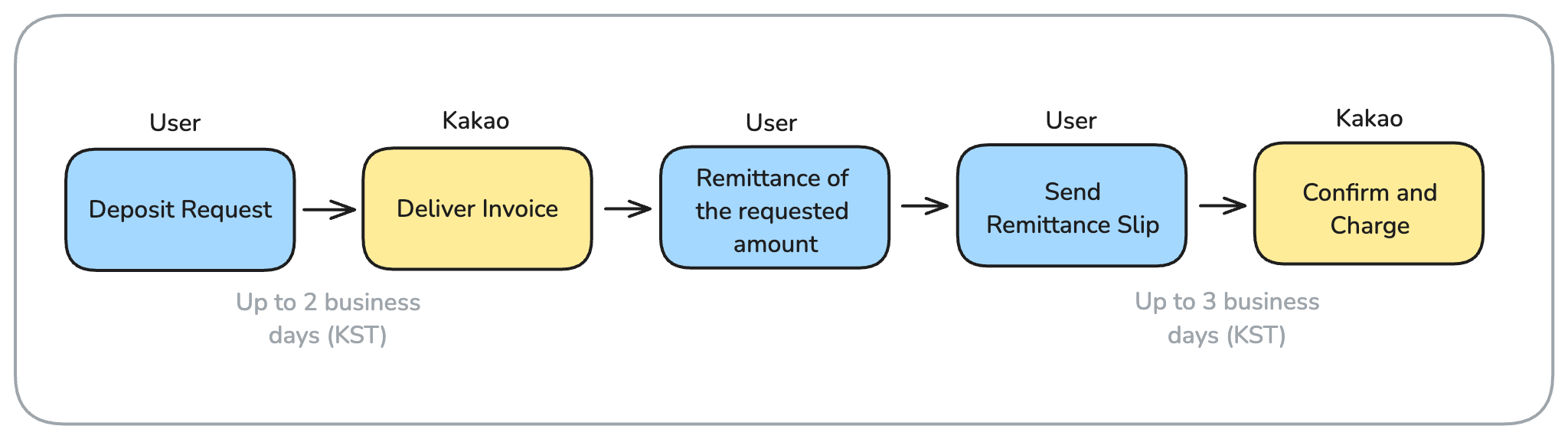
The prepaid manual payment method allows advertisers or agencies to deposit funds into Kakao’s dedicated account. After Kakao confirms the deposit, the corresponding amount will be loaded in the account.
**Step 1.** Go to "Setting" > "Payment Center"
**Step 2.** Click **\[ Deposit ]** at the top right.
**Step 3.** When the Deposit Funds window appears, select the Wallet you want to fund, then select the amount you want to add. Funds will be added in USD or JPY, depending on the selected Wallet.
{% hint style="info" %}
If you select Custom, you can enter your desired amount manually.\
For a Custom amount, enter numbers only. Do not enter currency symbols, commas (,), or other symbols.
{% endhint %}
**Step 4.** Click **\[ Deposit ]** to complete the load request. An operations manager will send you the invoicing/loading instructions.
**Step 5.** After completing the remittance, please send the remittance slip issued by your bank to the\
**\[ Support ]** board or to **** via email.
{% hint style="warning" %}
If the remittance slip is not provided, it may be difficult to verify the deposit details promptly, which could lead to delays in charging your cash balance.
{% endhint %}
{% hint style="info" %}
**Remittance Fee Information**
Due to the remittance and receiving fees charged during the transfer process, the amount actually deposited into your Kakao account may be less than the amount you requested.
{% endhint %}
{% hint style="info" %}
If you do not receive invoicing/loading instructions by email, please contact **\[ Support ]**.
{% endhint %}
{% hint style="warning" %}
It may take up to 2 Korean business days to issue the invoice after the request, and up to 3 Korean business days to reflect the deposit in the ad account after the remittance slip is confirmed, considering the time difference. Please take this into account when setting up your campaign in advance.
{% endhint %}
#### 2-1-2. Payment by Cards
If you have a credit card or debit card issued in Korea, or a Visa, Mastercard, American Express, or JCB card issued outside of Korea, you can use it as a payment method.
**Step 1.** Click the **\[ Deposit ]** button under **Setting > Payment Center**.
**Step 2.** After selecting the Wallet you want to fund, select the card payment method you want to use under Payment Method.
**Step 3.** Under Amount, select the amount you want to add. If you select Custom, you can enter your desired amount manually.
**Step 4.** Click the **\[ Deposit ]** button.
**Step 5.** A new window will pop up. Agree to the terms and conditions, select your card issuer, and proceed with the payment.
{% hint style="info" %}
When paying with a card issued in Korea, the payment will be authorized in Korean won (KRW). The amount added to the selected Wallet will be converted to KRW based on the exchange rate applied at the time of payment.
{% endhint %}
#### 2-1-3. Card Payment Cancellations and Refunds
If you would like to cancel or request a refund for funds added by card payment, please contact us through the \[Support] board.
**Partial cancellation and partial refund are not allowed** under the current policy, so if you want to cancel or refund, please ensure that the charged amount is not used through ad execution.
In addition, **refunds for card payments are only possible within 180 days** from the date of approval.\
Before requesting a refund, **all campaigns must be stopped (Status = off)**.
{% hint style="warning" %}
**If a campaign is still running at the time of the refund request, the administrator may stop the ad at their discretion, and Kakao is not responsible for any resulting consequences. Please take caution.**
{% endhint %}
After stopping the spending, please allow some time for the remaining balance to be confirmed before the refund process can begin.
{% hint style="success" %}
🙋🏻 **How are refunds or cancellations handled if I add funds by card while I still have a remaining balance from a foreign currency bank transfer?**
**Answer:** If you request a refund or cancellation after adding funds by card while you still have a remaining balance from a foreign currency bank transfer, the refund will be applied starting with the most recent payment.\
When requesting a refund through the **\[support] board**, please also include your **refund account information** in the request.
{% endhint %}
### 2-2. Postpaid
The postpaid monthly invoicing method requires signing a postpaid contract between the official agency and Kakao, along with securing credit protection. Once completed, the account is credited based on the assigned credit limit.
In other words, the amount spent during the current month is settled, and once payment for the settled amount is completed, the same amount is restored to the postpaid limit.
For postpaid advertisers, a separate postpaid credit limit is set for the USD Wallet and JPY Wallet. North American campaigns can run within the credit limit of the USD Wallet, while Japan campaigns can run within the credit limit of the JPY Wallet.
If you wish to proceed with this method, please contact \[Support].
{% hint style="success" %}
The amount spent by this month's execution will be finalized within up to **3 business days at the beginning of the following month, based on Korean business days**, and an invoice will be issued accordingly.\
The issued invoice must be paid into the Kakao account in accordance with the advertiser’s credit terms.
{% endhint %}
{% hint style="info" %}
For additional inquiries regarding Display Ads, please contact \[Support] within Global DSP.
{% endhint %}
## 3. Checking Your Loading & Spending
### 3-1. Checking your loading for prepaid and postpaid accounts
**Step 1.** Go to "Setting" > "Payment Center"
**Step 2.** You can check your loading and spending history via Paid Credit Transaction History.
### 3-2. Checking your loading and spending for promotional credit
**Step 1.** Go to "Setting" > "Payment Center"
**Step 2.** You can check your loading and spending history via Promotional Credit Transaction History.
{% hint style="info" %}
Would you like to check the loading/spending history from cash on a **daily basis**?\
\
In the **Cash Management** menu, you can view loading/spending history, but daily (or monthly) spending details are not available for direct viewing.\
However, you can check the spending details using the daily report feature.
**Step 1.** Go to the **‘Report’ > ‘Report Builder’** menu.\
**Step 2.** In the **Metric** section, select **‘Paid Cost’** for paid cash spending, or **‘Promo Cost’** for promotional (free) cash spending.\
Click the **\[Generate]** button to view the aggregated report data.
{% endhint %}
## 4. Requesting Refund for Ad Cash
**Step 1.** If you need a refund, please submit a request through the \[ Support ].
**Step 2.** For refunds in foreign currency, an invoice must be submitted. Please ensure the invoice includes the following required information:
| Required Information in the Invoice from the Refund Requester |
| ------------------------------------------------------------------------------------------------------------------------------------------------------------------------------------------------------------------------------------------------- |
| Ad Account ID, Payer Information (including address), Invoice Number, Issue Date, Payment Due Date, Currency Information and Amount in Foreign Currency, Bank Account Details for International Transfer, Stamp/Signature of the Refund Requester |
**Step 3.** Please note that the refund process may take approximately 5 to 7 Korean business days from the time the invoice is issued and delivered.
{% tabs %}
{% tab title="Official Contact" %}
For any inquiries, please use the \[Support] board on Kakao Global DSP.
{% endtab %}
{% tab title="Operational inquiries via email" %}
If you have any operational inquiries, please contact us at
{% endtab %}
{% tab title="Inquiry about new implementation" %}
If you are interested in launching new advertisements in the U.S. and Canada, please contact us at .
{% endtab %}
{% endtabs %}
---
# Agent Instructions
This documentation is published with GitBook. GitBook is the documentation platform designed so that both humans and AI agents can read, navigate, and reason over technical content effectively. Learn more at gitbook.com.
## Querying This Documentation
If you need additional information that is not directly available in this page, you can query the documentation by asking a question.
Perform an HTTP GET request on the following URL with the `ask` and `goal` query parameters:
```
GET https://kakaobusiness.gitbook.io/global/kakao-global-dsp-guide-english/quickstart.md?ask=&goal=
```
`ask` is the immediate question: it should be specific, self-contained, and written in natural language.
`goal` is what the user is ultimately trying to achieve, the reason they need the answer. Sharing it helps GitBook give you a better, more relevant answer. A goal is most helpful when it describes the outcome the user wants rather than restating the question. For example, with `ask=how do I create an API token`, a goal like `automate deployments from our CI pipeline` lets GitBook tailor the answer to that use case.
The response will contain a direct answer to the question and relevant excerpts and sources from the documentation.
Use this mechanism when the answer is not explicitly present in the current page, you need clarification or additional context, or you want to retrieve related documentation sections.