> For the complete documentation index, see [llms.txt](https://kakaobusiness.gitbook.io/global/llms.txt). Markdown versions of documentation pages are available by appending `.md` to page URLs; this page is available as [Markdown](https://kakaobusiness.gitbook.io/global/globaldsp-1/info.md).

# 紹介

Kakao Global DSPの主な特徴、対応マーケット、配信可能な広告商品、入札方式、および広告配信前に必要な準備事項についてご案内します。

{% hint style="success" %}
📌 Kakao Global DSP Link <https://global.ads.kakao.com/>
{% endhint %}

## 1.  カカオグローバル広告プラットフォーム(Kakao Global DSP)の紹介

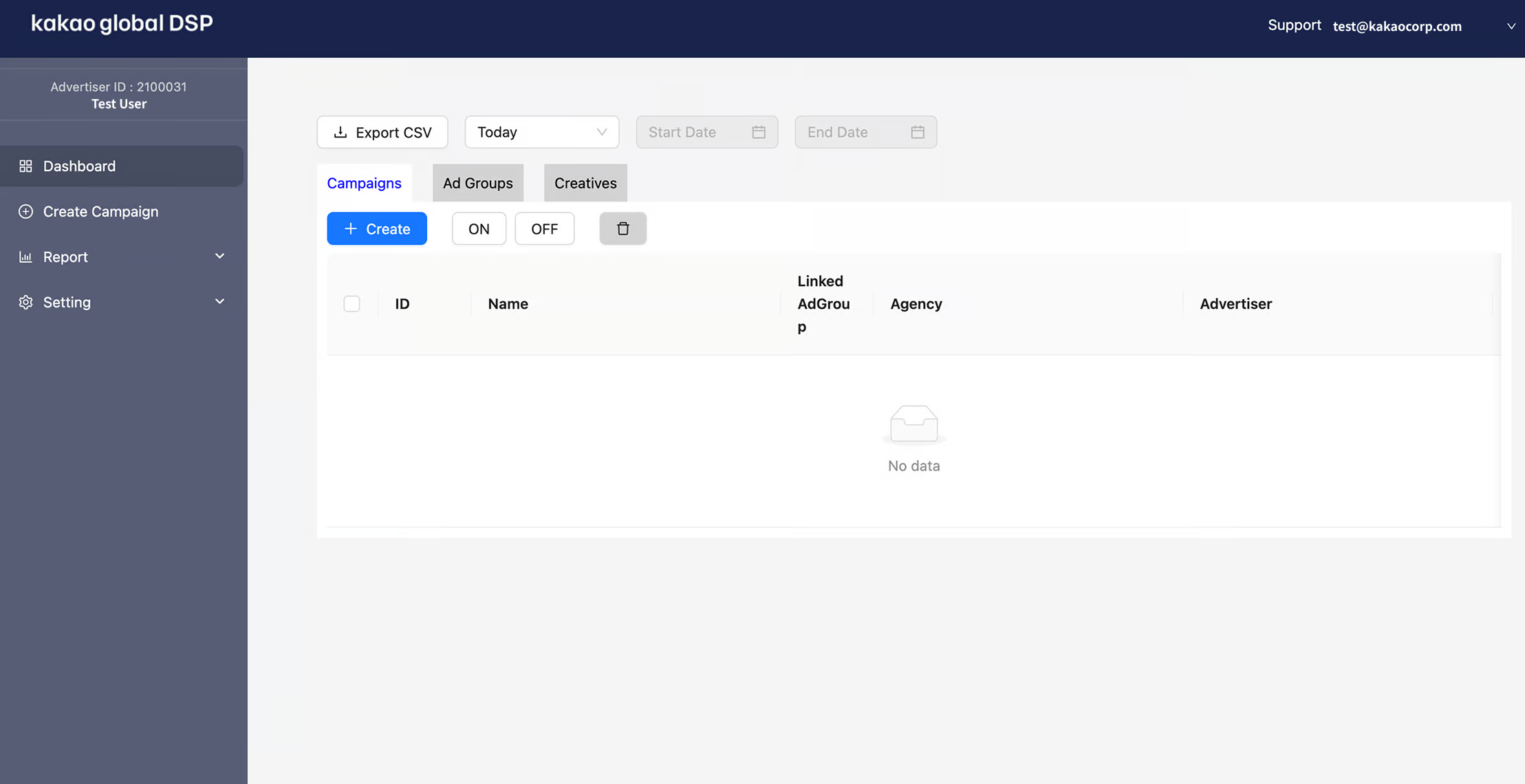
<figure><img src="https://1824564592-files.gitbook.io/~/files/v0/b/gitbook-x-prod.appspot.com/o/spaces%2FZIdMijaPpdo7q1K2szGv%2Fuploads%2Fy0vgC05QFwPSCbAQI3Y9%2Fimage.png?alt=media&amp;token=a868989c-d061-4f59-9c83-4b720dc1f05f" alt=""><figcaption></figcaption></figure>

カカオGlobal DSPは、米国および日本国内でカカオディスプレイ広告を出稿するための公式DSPプラットフォームです。

カカオGlobal DSPを通じてさまざまなメリットを享受できます。

* <mark style="color:$primary;">**韓国系/アジアを中心に影響力を持つメッセンジャー**</mark>\
  カカオトークは韓国僑民の大多数が使用している有力なサービスであり、Kakao Global DSPを活用することで、注目度の高い配信面に自然とディスプレイ広告を表示することができます。
* <mark style="color:$primary;">**さまざまな広告目的に合わせた最適化をサポート**</mark>\
  広告主が希望するランディングへの訪問を最大化し、広告主のビジネスに対する関心を購入・参加・インストールなどの行動へとコンバージョンされるよう誘導します。さらに、広告主の動画広告を多くの人が閲覧するように誘導して、広報及びブランディングを強化するなど、目標に合わせた最適化をサポートすることで、広告の効果を高めます。
* <mark style="color:$primary;">**配信面に最も適した広告クリエイティブの活用**</mark>\
  効果的なブランディングをすることができる動画素材、直感的な画像素材など、様々なクリエイティブを高い注目度をもって伝えることができます。

{% hint style="danger" %}
カカオGlobal DSPはChromeに最適化されています。
{% endhint %}

## 2. 出稿可能商品

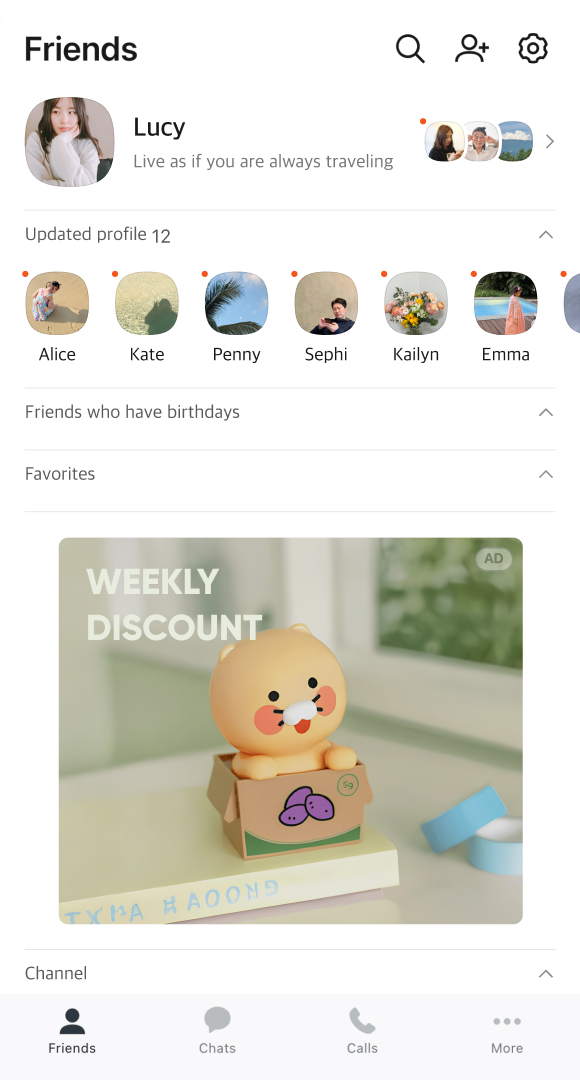
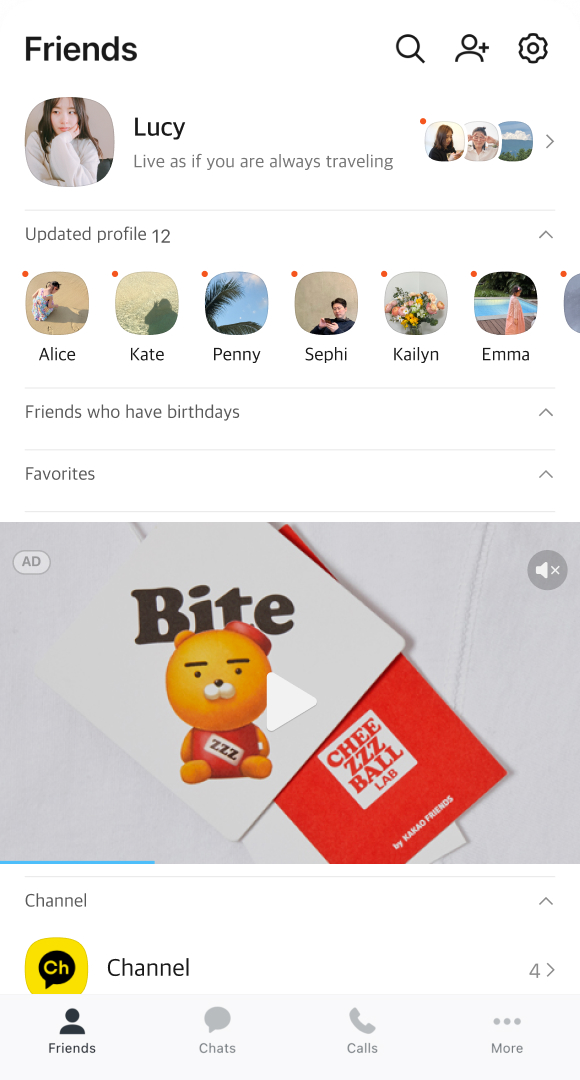
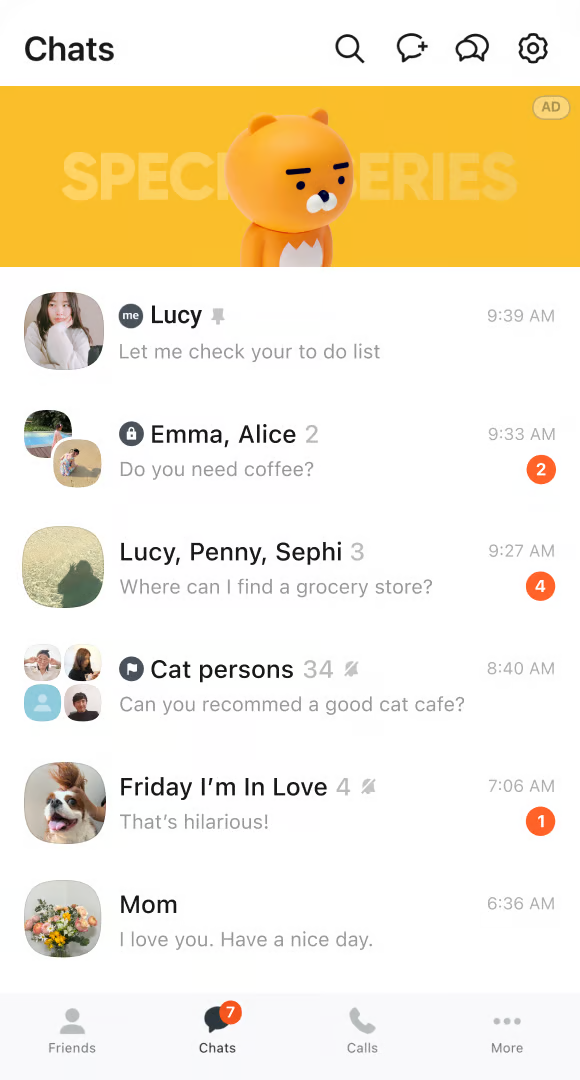
カカオGlobal DSPでは、カカともタブ、トークタブ、通話タブ内のディスプレイ広告と、トークタブ内のトークリストネイティブ広告を出稿することができます。日本市場でも、北米市場と同様の広告商品および運用方式を提供しています。

* <mark style="color:$primary;">**カカともタブ内のディスプレイ広告(バナー/動画)**</mark>

| 画像                                                                                                                                                                                                                                                                                        | 動画                                                                                                                                                                                                                                                                                        |
| ----------------------------------------------------------------------------------------------------------------------------------------------------------------------------------------------------------------------------------------------------------------------------------------- | ----------------------------------------------------------------------------------------------------------------------------------------------------------------------------------------------------------------------------------------------------------------------------------------- |
| <div><figure><img src="https://1824564592-files.gitbook.io/~/files/v0/b/gitbook-x-prod.appspot.com/o/spaces%2FZIdMijaPpdo7q1K2szGv%2Fuploads%2FM2kQfsr446mN4QFWW6Qh%2Fimage.png?alt=media&amp;token=40728e5b-4a38-4f52-8a2d-aecc6859a2b2" alt=""><figcaption></figcaption></figure></div> | <div><figure><img src="https://1824564592-files.gitbook.io/~/files/v0/b/gitbook-x-prod.appspot.com/o/spaces%2FZIdMijaPpdo7q1K2szGv%2Fuploads%2FshoViToyVMTSsWUEmO6g%2Fimage.png?alt=media&amp;token=1baf0b1f-94a4-4d25-9d9a-c07c2c39ee3e" alt=""><figcaption></figcaption></figure></div> |

* <mark style="color:$primary;">**トークタブ/通話タブ内のディスプレイ広告(バナー)**</mark>

| 画像(トークタブの上部)                                                                                                                                                                                                                                                            | 画像(通話タブ/音声通話、ビデオ通話の終了後)                                                                                                                                                                                                                                                                                                            |
| ----------------------------------------------------------------------------------------------------------------------------------------------------------------------------------------------------------------------------------------------------------------------- | ---------------------------------------------------------------------------------------------------------------------------------------------------------------------------------------------------------------------------------------------------------------------------------------------------------------------------------- |
| <p></p><p><img src="https://1824564592-files.gitbook.io/~/files/v0/b/gitbook-x-prod.appspot.com/o/spaces%2FZIdMijaPpdo7q1K2szGv%2Fuploads%2FBYymRB1TK2PgAGUvBs4y%2Fimage.png?alt=media&amp;token=ea6f7dc9-7ae9-4439-8e28-cfdfcbe74234" alt="" data-size="original"></p> | <img src="https://1824564592-files.gitbook.io/~/files/v0/b/gitbook-x-prod.appspot.com/o/spaces%2FZIdMijaPpdo7q1K2szGv%2Fuploads%2FFz4toIIEPQPEFSkG5JsO%2F%E1%84%90%E1%85%A9%E1%86%BC%E1%84%92%E1%85%AA%E1%84%90%E1%85%A2%E1%86%B8%20(1).png?alt=media&amp;token=2a88f314-dcf6-47fa-996c-8656c5a7a731" alt="" data-size="original"> |
|                                                                                                                                                                                                                                                                         |                                                                                                                                                                                                                                                                                                                                    |

* <mark style="color:$primary;">**トークタブ内のネイティブ広告**</mark>

<table><thead><tr><th width="355.28125">ネイティブ広告(トークタブ内のリスト)</th></tr></thead><tbody><tr><td><img src="https://1824564592-files.gitbook.io/~/files/v0/b/gitbook-x-prod.appspot.com/o/spaces%2FZIdMijaPpdo7q1K2szGv%2Fuploads%2FSfrCAeZLyUG9dhZs2lbA%2Fimage.png?alt=media&amp;token=286067ca-41ac-4016-8153-68f34725e0b1" alt="" data-size="original"></td></tr></tbody></table>

## 3. 入札方式

Kakao Global DSPの入札方式は、CPM BaseのRTB方式で行われています。<br>

### 3-1. CPM(Cost Per Mille)に基づく手動入札

CPMは1,000回表示あたりの課金方式で、<mark style="color:$primary;">**広告が表示されるたびに課金**</mark>が発生します。

<table><thead><tr><th width="150"></th><th width="599.4285714285713"></th></tr></thead><tbody><tr><td><mark style="color:$primary;"><strong>広告タイプ</strong></mark></td><td><ul><li>カカともタブ内のディスプレイ広告(画像/動画)</li><li>トークタブ/通話タブ内のディスプレイ広告(画像)</li><li>トークタブ内のネイティブ広告(トークリスト)</li></ul><p>の中から選択できます。</p></td></tr><tr><td><mark style="color:$primary;"><strong>入札金額</strong></mark></td><td><ul><li><p>入札価格は、キャンペーンで選択したマーケットの通貨を基準に設定されます。</p><ul><li>北米マーケット：USD、最低入札価格 $3 ～ 最高入札価格 $150（小数点以下2桁まで入力可能）</li><li>日本マーケット：JPY、最低入札価格 ¥200 ～ 最高入札価格 ¥20,000</li></ul></li></ul></td></tr><tr><td><mark style="color:$primary;"><strong>参考事項</strong></mark></td><td><ul><li>上記の内容は税抜金額（供給価額）を基準としており、広告を配信する事業者の所在国の税法により、VATの適用が異なる場合があります。</li></ul></td></tr></tbody></table>

## 4. 広告出稿

### 4-1. 直接出稿(OLS)

カカオGlobal DSPは使いやすく直感的なメニューで構成されているため、誰でも広告登録からレポート確認まで直接運用できます。広告を出稿する前に、目的に応じて以下のガイドをお読みください。

* <mark style="color:$primary;">**クイックスタートガイド**</mark>\
  初めての方のために、カカオGlobal DSPへの会員登録から出稿まで、素早く行う方法をご案内します。
* <mark style="color:$primary;">**広告出稿**</mark>\
  タイプ別の広告の作成方法について詳しく説明します。

### 4-2. 代理店を通じた出稿

広告を直接運用することが難しい場合は、公式代理店のサポートを受けることができます。

{% content-ref url="/pages/jZMrOYeSZ3rQln2Sue4u" %}
[公式代理店一覧](/global/partnersupport-1/agencylist.md)
{% endcontent-ref %}

### 4-3. 韓国事業者として出稿

Kakao Global DSPは、北米（米国・カナダ）および日本のマーケットに対応しています。会員登録時に、広告主の事業者所在地に応じて国を選択できます。

韓国事業者として出稿(VATの追加課金後、税金計算書の発行など)をご希望の場合はsupport\_<ads@kakaocorp.com>、<support_ads@kakaocorp.com>までお問い合わせください。

{% tabs %}
{% tab title="公式お問い合わせ掲示板" %}
Kakao Global DSP内の\[Support]掲示板からお問い合わせください。
{% endtab %}

{% tab title="運用に関するメールお問い合わせ" %}
運用に関するお問い合わせがございましたら、<support_ads@kakaocorp.com>までご連絡ください。
{% endtab %}

{% tab title="新規導入に関するお問い合わせ" %}
北米内での新規の広告出稿をご希望の場合は、<support_ads@kakaocorp.com>までお問い合わせください。
{% endtab %}
{% endtabs %}


---

# Agent Instructions
This documentation is published with GitBook. GitBook is the documentation platform designed so that both humans and AI agents can read, navigate, and reason over technical content effectively. Learn more at gitbook.com.

## Querying This Documentation
If you need additional information that is not directly available in this page, you can query the documentation by asking a question.

Perform an HTTP GET request on the following URL with the `ask` and `goal` query parameters:

```
GET https://kakaobusiness.gitbook.io/global/globaldsp-1/info.md?ask=<question>&goal=<user_goal>
```

`ask` is the immediate question: it should be specific, self-contained, and written in natural language.
`goal` is what the user is ultimately trying to achieve, the reason they need the answer. Sharing it helps GitBook give you a better, more relevant answer. A goal is most helpful when it describes the outcome the user wants rather than restating the question. For example, with `ask=how do I create an API token`, a goal like `automate deployments from our CI pipeline` lets GitBook tailor the answer to that use case.

The response will contain a direct answer to the question and relevant excerpts and sources from the documentation.

Use this mechanism when the answer is not explicitly present in the current page, you need clarification or additional context, or you want to retrieve related documentation sections.
