> For the complete documentation index, see [llms.txt](https://kakaobusiness.gitbook.io/global/llms.txt). Markdown versions of documentation pages are available by appending `.md` to page URLs; this page is available as [Markdown](https://kakaobusiness.gitbook.io/global/channel-2/info.md).

# 紹介

あなたのビジネスにぴったりのカカオトークチャンネルを作成してみましょう。

**トークで始めるビジネス。誰でも簡単に、無料で自分のビジネスを始められます。**\
カカオトークチャンネルの多彩な機能を活用して、コストを削減し、業務を効率化しましょう。

<figure><img src="https://1824564592-files.gitbook.io/~/files/v0/b/gitbook-x-prod.appspot.com/o/spaces%2FZIdMijaPpdo7q1K2szGv%2Fuploads%2F88Nh4MtAkrFpjmUkNMld%2Fimage.png?alt=media&amp;token=26c7fb4d-e422-4ed1-ad02-c9473260f2f4" alt=""><figcaption></figcaption></figure>

## **1. チャンネル基本紹介**

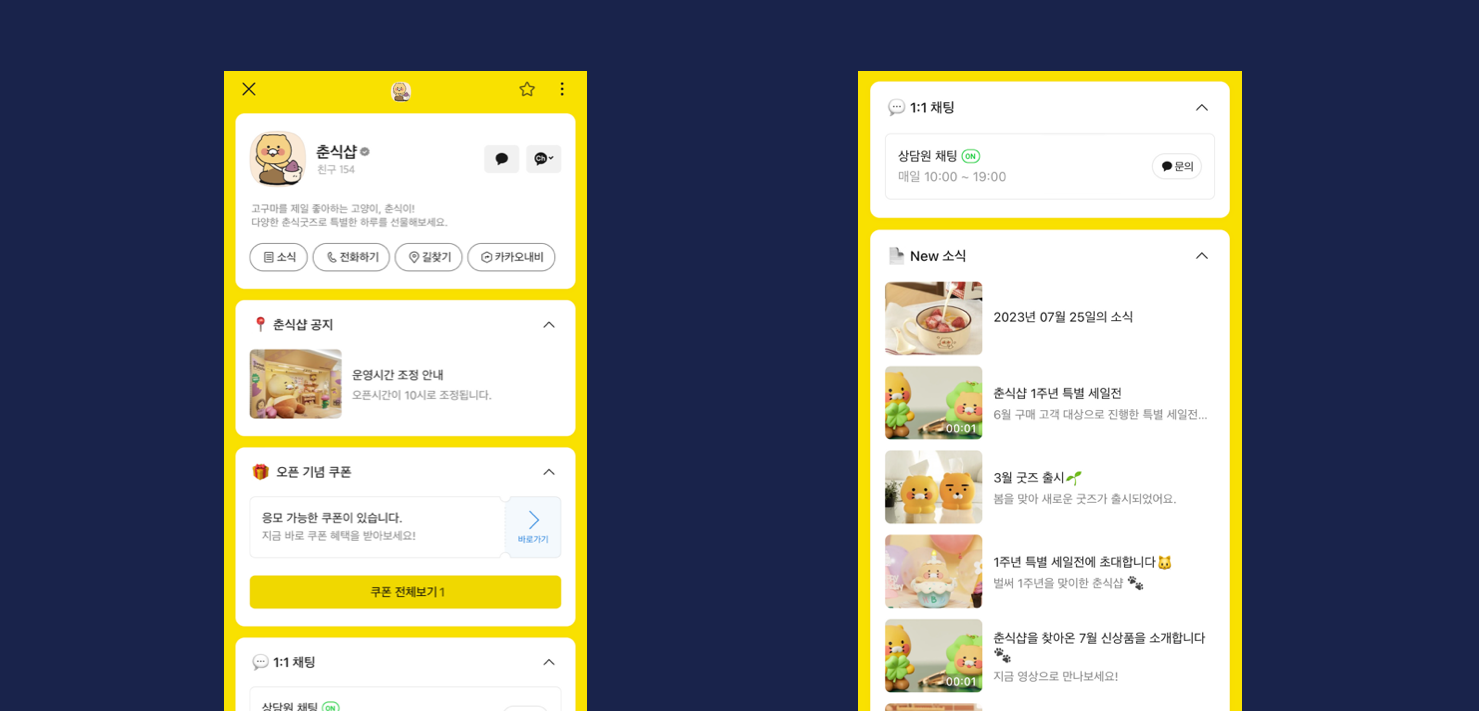
チャンネルを開設して、ビジネス情報や最新情報を発信できます。\
ビジネスの目的に合わせて多彩なカードを活用し、魅力的なチャンネルを作成してみましょう。

<figure><img src="https://1824564592-files.gitbook.io/~/files/v0/b/gitbook-x-prod.appspot.com/o/spaces%2FZIdMijaPpdo7q1K2szGv%2Fuploads%2FyWF2AOJWD4GERJIiItwa%2Fimage.png?alt=media&amp;token=4f0ef9a8-fa20-4669-936d-1e2d1f25dcc5" alt=""><figcaption></figcaption></figure>

### **1-1.** 主な機能

<figure><img src="https://1824564592-files.gitbook.io/~/files/v0/b/gitbook-x-prod.appspot.com/o/spaces%2FZIdMijaPpdo7q1K2szGv%2Fuploads%2FZUiyFHpqnafj0HJ5iydF%2Fimage.png?alt=media&amp;token=546269c9-996a-410e-8c71-b10007313251" alt=""><figcaption></figcaption></figure>

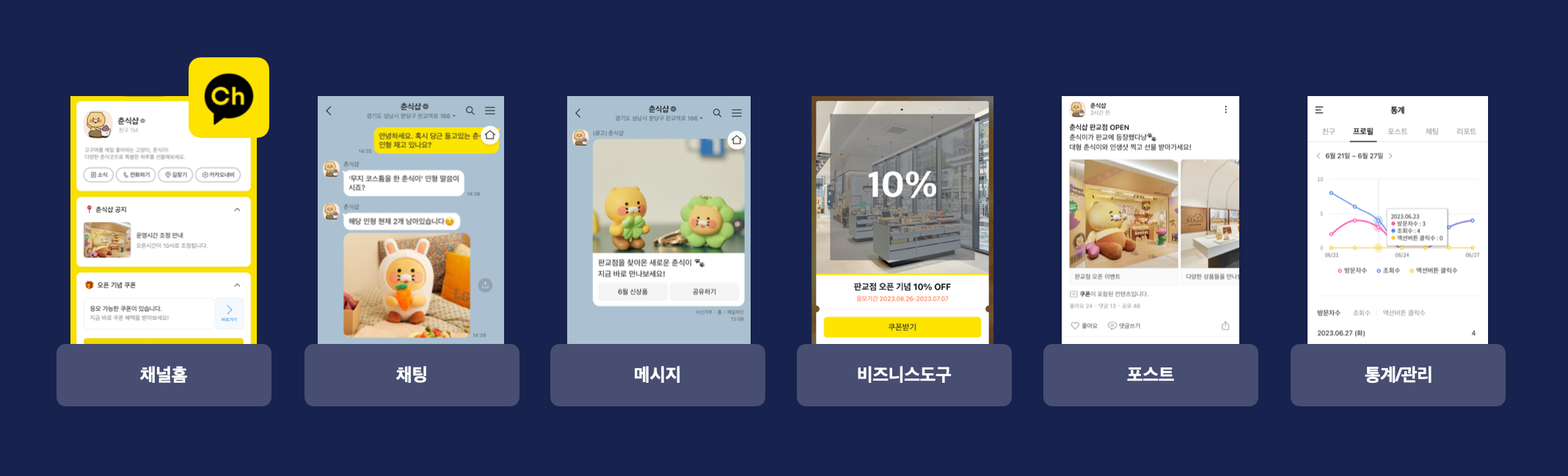
* **チャット**\
  カカオトークの1対1チャットを活用して、お問い合わせや予約、相談などに対応できます。\
  チャット対応時間の設定、チャットリストの管理、メモ、自動応答などの便利な機能を活用することで、お客様とのリアルタイムなコミュニケーションがよりスムーズになります。

<figure><img src="https://1824564592-files.gitbook.io/~/files/v0/b/gitbook-x-prod.appspot.com/o/spaces%2FZIdMijaPpdo7q1K2szGv%2Fuploads%2FyluvEHMOhUBuOwZW3hWb%2Fimage.png?alt=media&amp;token=8e5d8491-4852-460a-b82b-5f5d052e43c8" alt=""><figcaption></figcaption></figure>

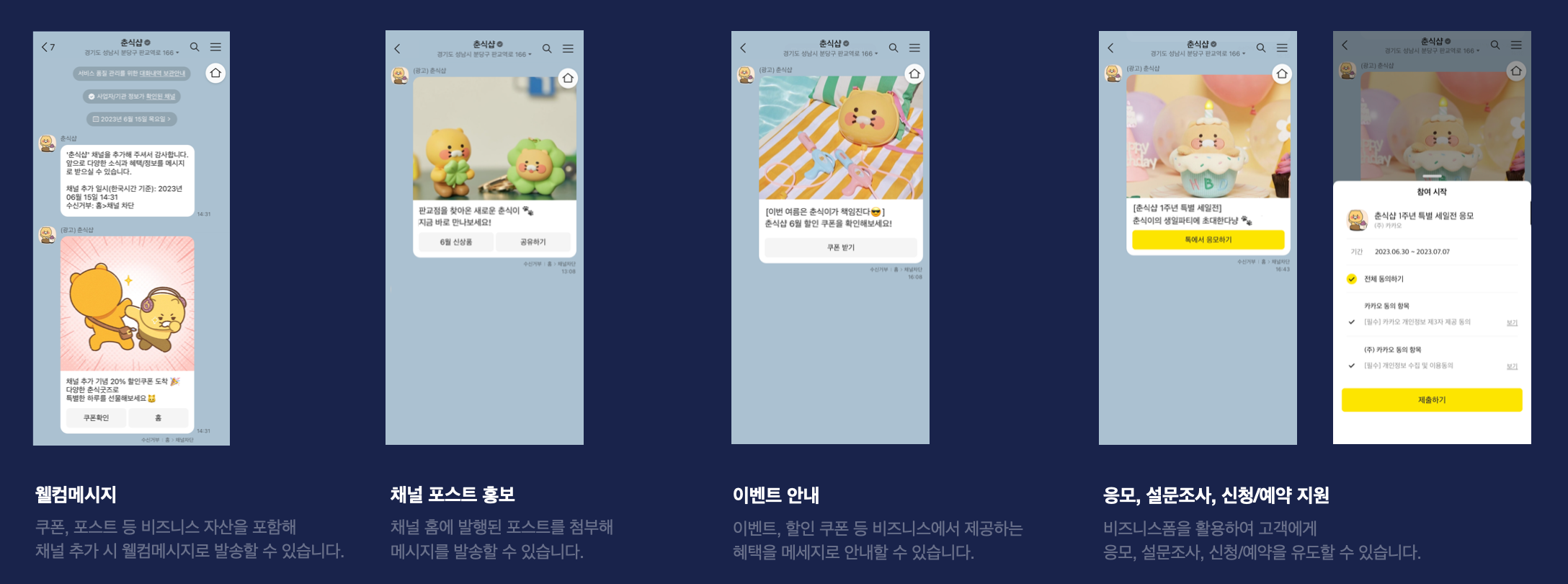
* **メッセージ**\
  リアルタイム通知やお知らせ、イベント、割引クーポン、アンケートなどをカカオトークのメッセージで配信できます。\
  多彩な形式のメッセージで注目度を高め、精度の高いターゲティングによって友だちからの反応を引き出すことができます。

<figure><img src="https://1824564592-files.gitbook.io/~/files/v0/b/gitbook-x-prod.appspot.com/o/spaces%2FZIdMijaPpdo7q1K2szGv%2Fuploads%2FdqXhZNmrTqeHeQvUfG4i%2Fimage.png?alt=media&amp;token=9c7f4b7a-310c-45ea-8081-5bb8335979e9" alt=""><figcaption></figcaption></figure>

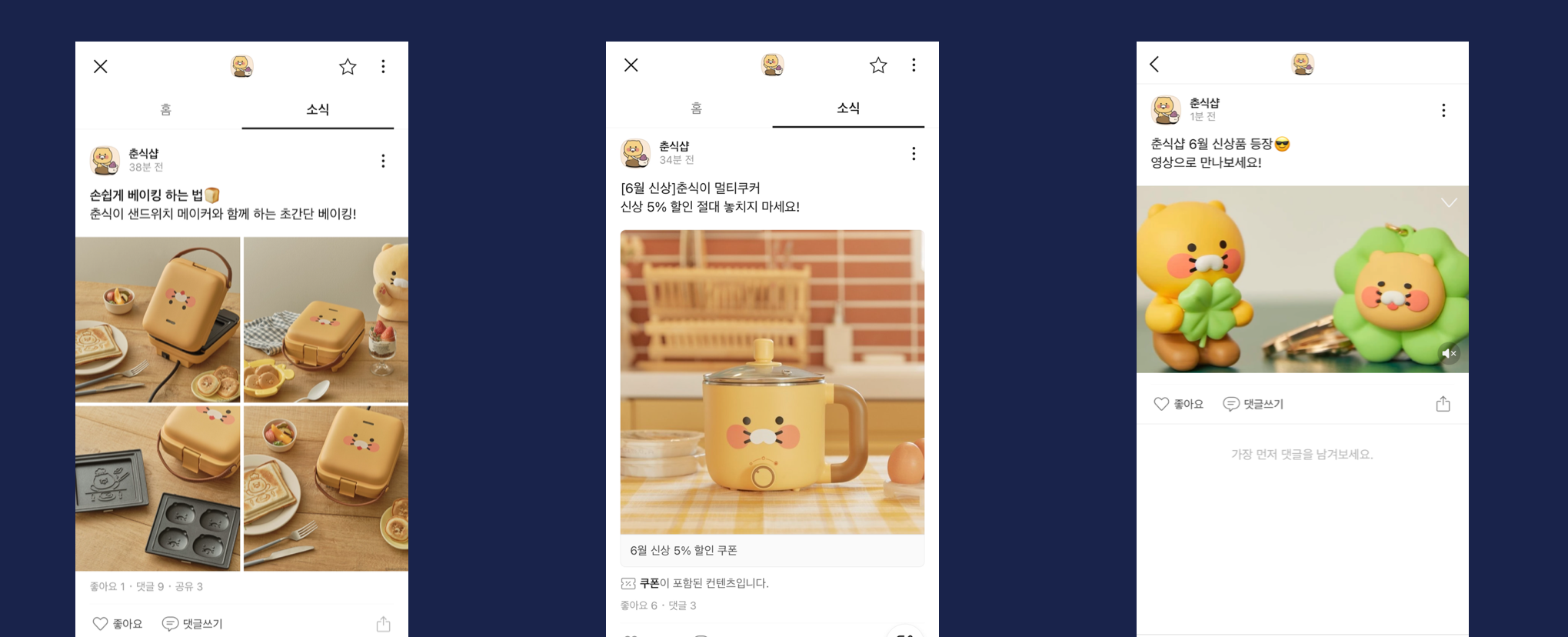
* **お知らせ**\
  お知らせを投稿するとチャンネルホームに表示され、カカオトークユーザーにチャンネルの最新情報を発信できます。\
  「いいね」やコメントを通じて友だちの反応を確認でき、シェア機能を活用してお知らせを広く拡散することもできます。

<figure><img src="https://1824564592-files.gitbook.io/~/files/v0/b/gitbook-x-prod.appspot.com/o/spaces%2FZIdMijaPpdo7q1K2szGv%2Fuploads%2F8DdsR6i7ODhPQnjN1ESB%2Fimage.png?alt=media&amp;token=517bd0ef-246f-4449-970a-475c97aaf274" alt=""><figcaption></figcaption></figure>

* **お知らせ・クーポン ＞ クーポンを作成**\
  カカオトークユーザー向けにその場で当選結果がわかるクーポンを作成し、メッセージやカードビューに添付することができます。\
  ユーザーにさまざまな特典を提供して、ブランドをPRしましょう。

<figure><img src="https://1824564592-files.gitbook.io/~/files/v0/b/gitbook-x-prod.appspot.com/o/spaces%2FZIdMijaPpdo7q1K2szGv%2Fuploads%2Fh4z2mDn7n2BT7q9W0D8L%2Fimage.png?alt=media&amp;token=5939169f-a2b0-4617-adc0-5b89ca3a2c60" alt=""><figcaption></figcaption></figure>

* **チャット ＞ チャットルームメニュー**\
  ワンクリックで必要な情報をすぐに確認できるよう、ボタンを設定できます。\
  お客様からよく寄せられる質問や、伝えたいさまざまな情報をボタンに設定してみましょう。

<figure><img src="https://1824564592-files.gitbook.io/~/files/v0/b/gitbook-x-prod.appspot.com/o/spaces%2FZIdMijaPpdo7q1K2szGv%2Fuploads%2FJ98uxeXYvPGqITILqkg3%2Fimage.png?alt=media&amp;token=a407053d-fe94-42ac-85e7-1e59b4f51a35" alt=""><figcaption></figcaption></figure>

* **チャンネル ＞ チャットボット連携**\
  チャットボットを活用して、店舗検索、配送状況の確認、予約、注文など、さまざまなお問い合わせに24時間いつでも簡単に自動対応できます。\
  カカオ i オープンビルダーで作成したチャットボットをチャンネルに連携して利用できます。

### **1-2.** パートナーが得た効果

<figure><img src="https://1824564592-files.gitbook.io/~/files/v0/b/gitbook-x-prod.appspot.com/o/spaces%2FZIdMijaPpdo7q1K2szGv%2Fuploads%2FKOamlOL0jCKV5I1ZuZMt%2F%E1%84%89%E1%85%B3%E1%84%8F%E1%85%B3%E1%84%85%E1%85%B5%E1%86%AB%E1%84%89%E1%85%A3%E1%86%BA%202022-09-08%20%E1%84%8B%E1%85%A9%E1%84%92%E1%85%AE%201.29.18.png?alt=media&amp;token=0f8bf94d-fae7-42a1-b410-3a1bbfd8f727" alt=""><figcaption></figcaption></figure>

* **影響力の拡大**\
  カカオトークチャンネルパートナーの友だち総数 11億8,000万人\
  10万人以上の友だちを持つパートナー 1,151社\
  \*2022年基準

<figure><img src="https://1824564592-files.gitbook.io/~/files/v0/b/gitbook-x-prod.appspot.com/o/spaces%2FZIdMijaPpdo7q1K2szGv%2Fuploads%2FLh5ocO7F2Irz1PHDXfUt%2Fimage.png?alt=media&amp;token=1e66602f-5dd9-47f5-b28f-364f3a3e77cf" alt=""><figcaption></figcaption></figure>

* **ビジネスの好循環**\
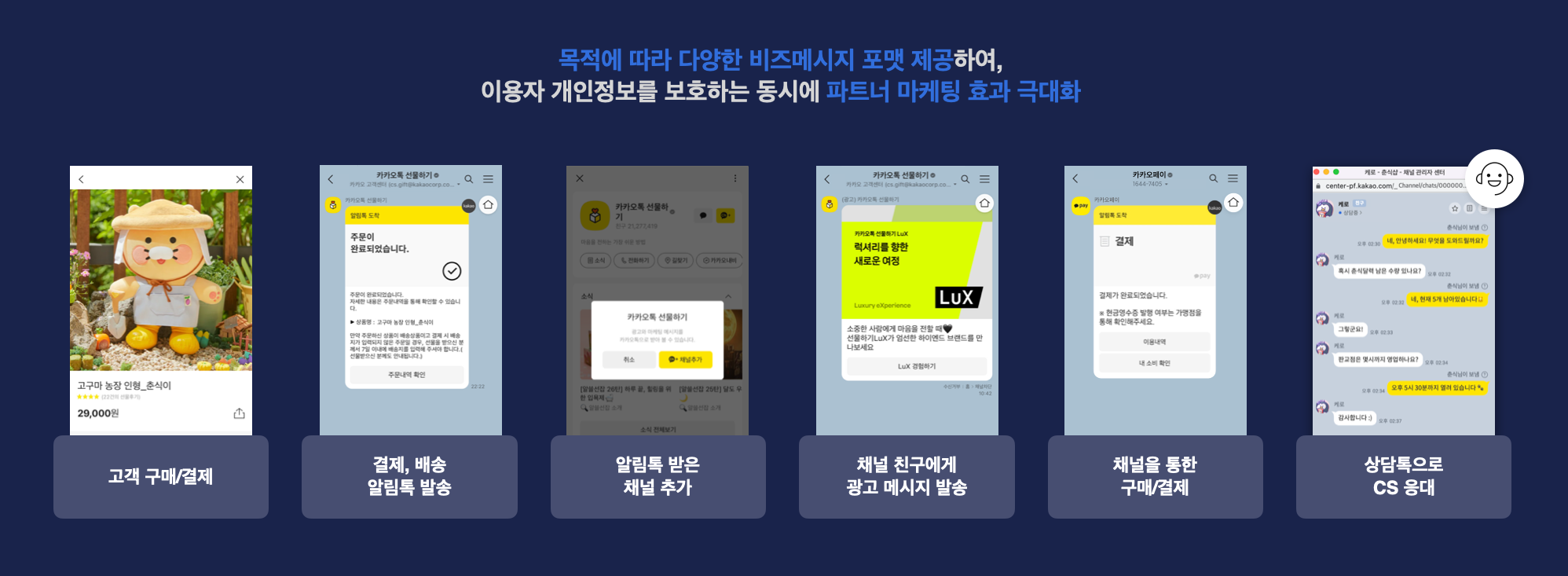
  商品購入時に、SMSの代わりに「알림톡（アリムトーク）」を利用することで、より低コストで情報メッセージを配信できます。\
  チャンネルを追加したお客様には、メッセージや「친구톡（チングトーク）」を通じて広告メッセージを配信できます。\
  1対1のチャットが可能な「상담톡（サンダムトーク）」を活用することで、お客様と継続的かつリアルタイムなコミュニケーションが可能です。

<figure><img src="https://1824564592-files.gitbook.io/~/files/v0/b/gitbook-x-prod.appspot.com/o/spaces%2FZIdMijaPpdo7q1K2szGv%2Fuploads%2FHST5Ow1qiRnEEKpnmMFD%2Fimage.png?alt=media&amp;token=e030780f-362b-46a7-9268-e163995057ea" alt=""><figcaption></figcaption></figure>

* **コスト削減**\
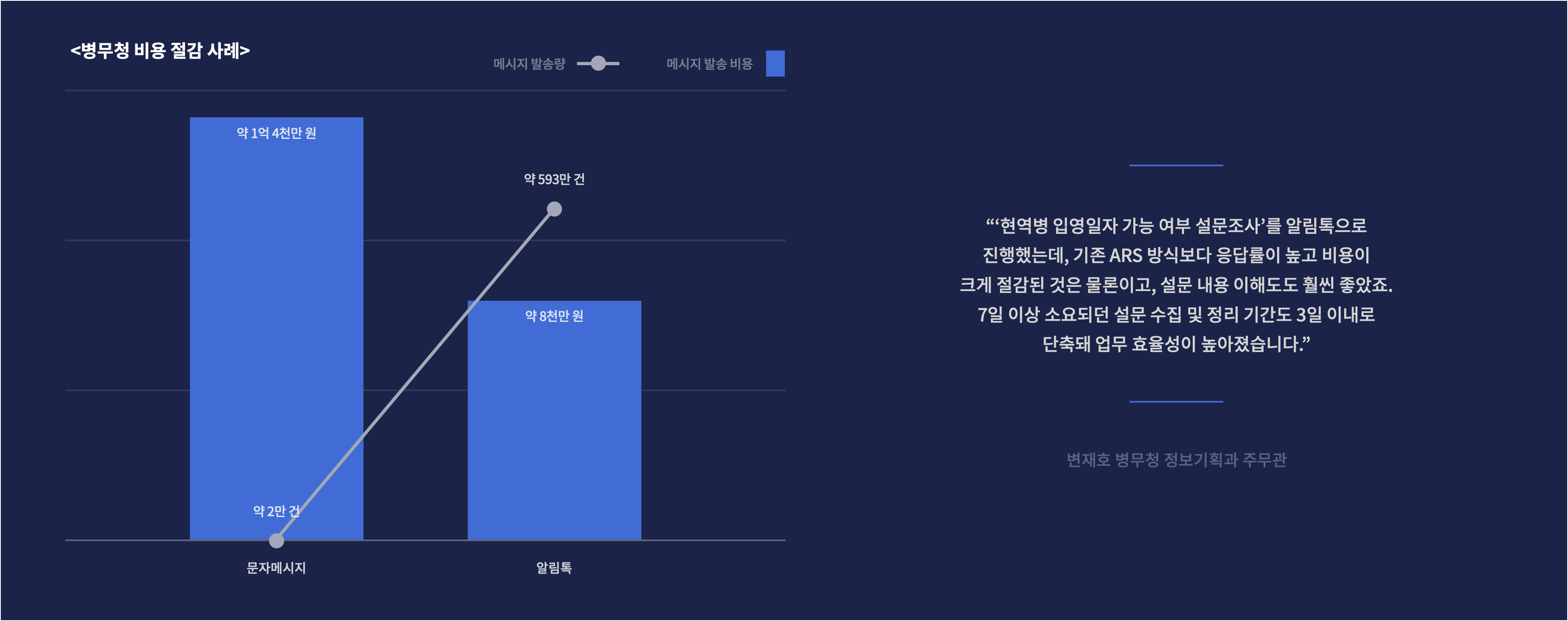
  アリムトークは従来のSMSよりも低コストで利用でき、多くの企業や機関のコスト削減に貢献しています。\
  アリムトークを利用することで、従来と比べてコストを70％削減できます。

<figure><img src="https://1824564592-files.gitbook.io/~/files/v0/b/gitbook-x-prod.appspot.com/o/spaces%2FZIdMijaPpdo7q1K2szGv%2Fuploads%2Fl1iNPUhTLPZ66fs8wKrf%2Fimage.png?alt=media&amp;token=3efd9e8c-d3fe-4829-a201-968c778d787a" alt=""><figcaption></figcaption></figure>

* **業務効率と顧客満足度の向上**\
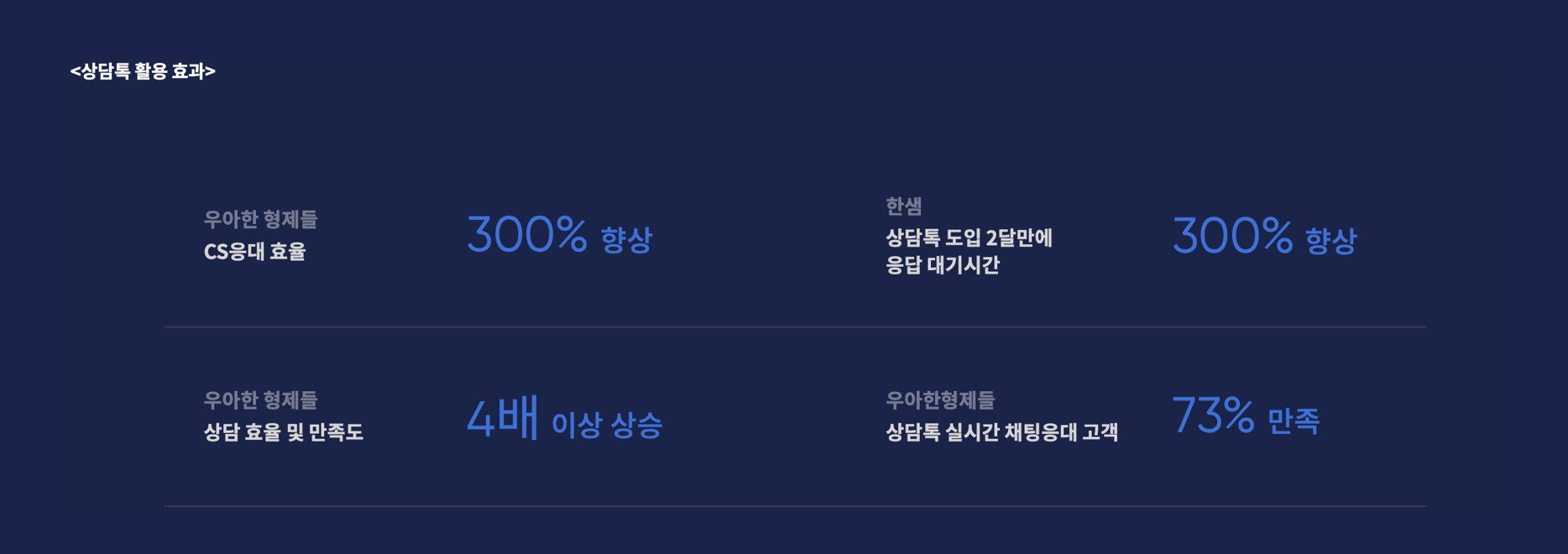
  サンダムトークは、従来ARSで行われていたお問い合わせ対応に代わり、リアルタイムかつ効率的な顧客対応を可能にします。\
  顧客満足度の向上と同時に、オペレーターの業務への適応度や満足度の向上も期待できます。\
  アリムトークは、従来のSMSよりも便利で信頼性の高いサービスとしてお客様に認識されており、パートナーのスムーズな業務遂行をサポートします。

## 2. チャンネルを始める

1. カカオビジネスに会員登録
2. <https://us-center-pf.kakao.com> にアクセス
3. チャンネルを開設
4. プロフィールおよびホームタブを設定
5. チャンネルの各種機能を活用して、ビジネス目標を達成


---

# Agent Instructions
This documentation is published with GitBook. GitBook is the documentation platform designed so that both humans and AI agents can read, navigate, and reason over technical content effectively. Learn more at gitbook.com.

## Querying This Documentation
If you need additional information that is not directly available in this page, you can query the documentation by asking a question.

Perform an HTTP GET request on the following URL with the `ask` and `goal` query parameters:

```
GET https://kakaobusiness.gitbook.io/global/channel-2/info.md?ask=<question>&goal=<user_goal>
```

`ask` is the immediate question: it should be specific, self-contained, and written in natural language.
`goal` is what the user is ultimately trying to achieve, the reason they need the answer. Sharing it helps GitBook give you a better, more relevant answer. A goal is most helpful when it describes the outcome the user wants rather than restating the question. For example, with `ask=how do I create an API token`, a goal like `automate deployments from our CI pipeline` lets GitBook tailor the answer to that use case.

The response will contain a direct answer to the question and relevant excerpts and sources from the documentation.

Use this mechanism when the answer is not explicitly present in the current page, you need clarification or additional context, or you want to retrieve related documentation sections.